
When to Use an AI Photo Upscaler: 5 Real-World Scenarios
AI photo upscaling gets a lot of attention, but the more useful question is a practical one: in which specific situations does it actually make a difference worth acting on? Not every image needs upscaling, and not every resolution problem is best solved this way. This guide covers five concrete scenarios where reaching for a good AI photo upscaler makes the right call — with clear reasoning for why upscaling works in each case and what to realistically expect from the output.
Scenario 1: Supplier Product Photos That Don't Meet Marketplace Requirements
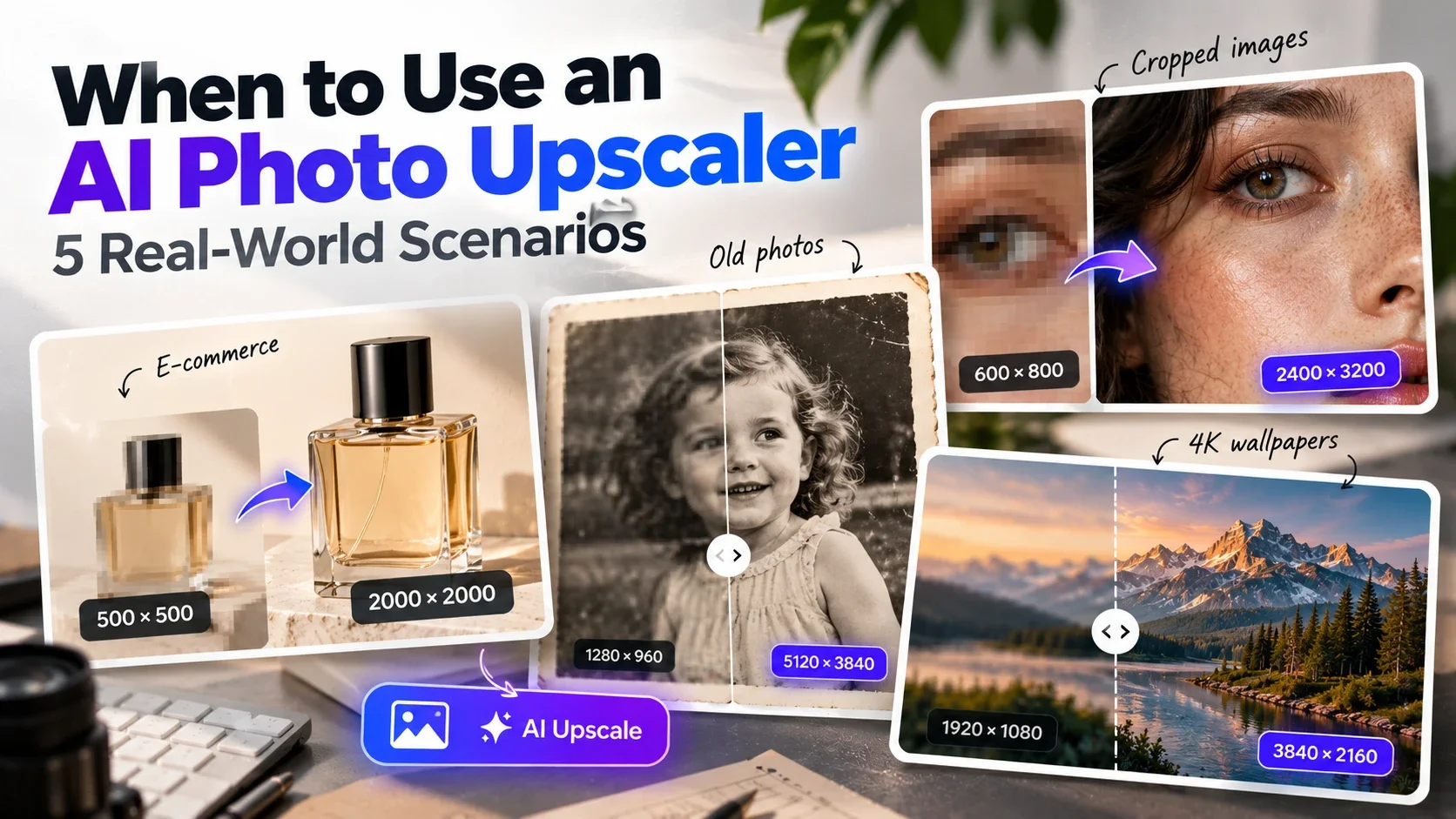
This is probably the most common practical use case for AI upscaling in 2026. Manufacturers and distributors send product images at whatever resolution works for their catalog — which is often 500x500 to 800x800 pixels. That's enough to see what the product looks like, but it falls short of what modern marketplaces expect.
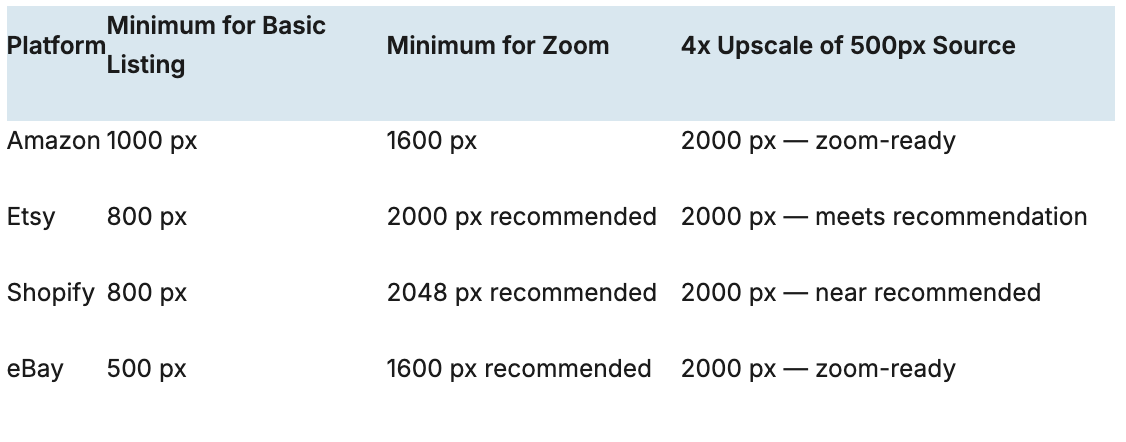
Amazon requires a minimum of 1000 pixels on the longest side for basic listings, and at least 1600 pixels to enable the zoom feature that significantly affects conversion. Etsy recommends 2000x2000. Shopify stores built for high-resolution displays benefit from images at 2048 pixels or larger. A supplier's 600x600 product photo, upscaled 4x to 2400x2400, typically meets all of these requirements with a result that looks sharper than the original.
The alternative — requesting higher-resolution files from every supplier, or arranging new product photography — takes time and often isn't possible. A 4x AI upscale achieves in seconds what would otherwise require a full reshooting workflow.
Scenario 2: Old Family Photos from Scans or Early Digital Cameras
Photos from the 1990s and early 2000s have a resolution problem by today's standards. A photo taken with a 1-megapixel camera from 2001 is roughly 1280x960 pixels — fine for a small print but noticeably soft on a modern 4K display or printed larger than 4x3 inches at standard quality.
Scanned prints have a similar issue. Even a careful scan at 600 DPI of a standard 4x6 print produces 2400x3600 pixels — enough for a decent reprint, but a 4x upscale to 9600x14400 gives significantly more flexibility for large prints, wall art, or high-resolution digital archiving.
AI upscaling is particularly well-suited to this use case because old photos typically have genuine content to reconstruct — the image quality is limited by the original capture technology, not by a lack of real-world detail in the scene. The AI can recover fine texture that was blurred by low-resolution digitization.
2x upscale — good for bringing a scan up to comfortable display resolution on modern screens
4x upscale — necessary for large-format prints (A3 and above) or high-resolution archiving
Scenario 3: Cropped Images Where the Subject Is Too Small
Cropping is one of the most common reasons an otherwise good photo ends up at an unusable resolution. You shoot a portrait, crop tightly to remove a distracting background, and end up with a 600x800 pixel face where you started with a 2400x3200 pixel full-body shot. Or you capture a product in a wide scene, crop to isolate it, and the cropped result is too small for the listing.
A 4x AI upscale of the cropped version recovers most of the lost pixel count. A 600x800 crop becomes 2400x3200 — the same dimensions as the uncropped original. Whether the upscaled version matches the quality of the original depends on how tightly it was cropped and the quality of the source, but in most cases the result is usable where the crop alone was not.
This is a significantly better outcome than re-cropping less tightly (losing the composition you wanted) or abandoning the shot entirely.
Scenario 4: Desktop Wallpapers and Display Assets for 4K Screens
4K monitors (3840x2160 pixels) are standard in most offices and home setups. When a wallpaper or display asset is smaller than the screen's native resolution, the operating system upscales it automatically — using basic interpolation that produces a visibly soft result.
The practical consequence: a 1920x1080 wallpaper on a 4K screen looks noticeably softer than a native 3840x2160 image. A 2x AI upscale of the 1920x1080 source produces exactly the right output for a 4K display, with the detail reconstruction that AI provides rather than the OS's basic interpolation.
The same logic applies to any display asset that needs to look sharp on high-DPI screens — presentation backgrounds, digital signage, hero images for large displays. 2x upscaling from a 1080p source typically produces a 4K-ready output; 4x upscaling from a 540p source achieves the same.
Scenario 5: Phone Photos Intended for Large-Format Print
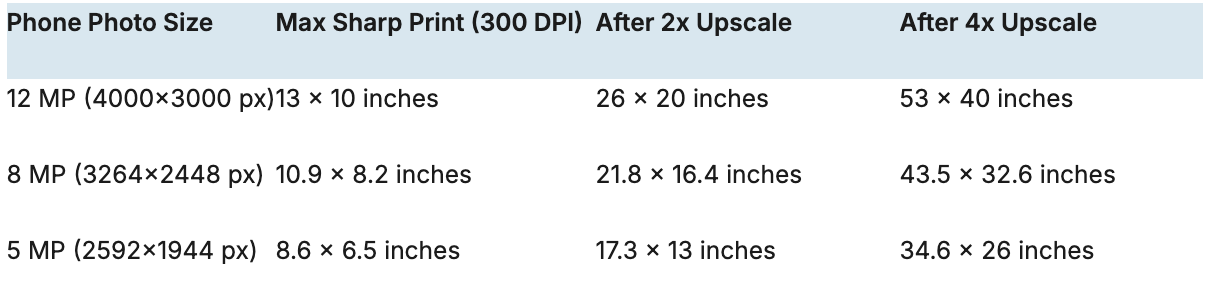
Modern smartphones take excellent photos — but there's a gap between how they look on screen and whether they print well at larger sizes. A typical phone photo from a mid-range device is around 12 megapixels (4000x3000 pixels). That's enough for sharp prints up to about 13x10 inches at 300 DPI. Beyond that size, the image starts to look soft in print.
For common requests — a 16x20 framed print, an A2 poster, a canvas wrap — the source phone photo often doesn't have enough pixels to print at full quality. A 2x upscale of a 4000x3000 photo produces 8000x6000 pixels, which covers prints up to 26x20 inches at 300 DPI. A 4x upscale produces 16000x12000 pixels — enough for very large format printing.
Anyone ordering a print from a phone photo benefits from upscaling before submission, especially for sizes above A4. Many print services warn about low resolution at checkout — AI upscaling is the most effective way to address those warnings without a new photoshoot.
When Not to Use an AI Upscaler
It's worth being clear about the situations where upscaling doesn't help or isn't the right tool:
Images already at adequate resolution for the intended use — upscaling a 4000x3000 photo for a web thumbnail creates unnecessarily large file sizes with no visible benefit
Severely blurry or out-of-focus photos — upscaling makes them larger but doesn't fix the focus problem; the result is a larger blurry image
Heavily compressed images with significant JPEG artifacts — upscaling can amplify these; always start from the best-quality source available
Images that need a specific pixel dimension rather than just larger — if you need exactly 1200x628 for an ad platform, resize to those dimensions directly
How to Upscale on Phototune.ai
Phototune.ai offers a free AI photo upscaler that handles all five scenarios above. You can try it at AI photo upscaler free — no account required, works in any browser. Upload your image, choose 2x or 4x depending on your target output size, and download the result in seconds.
Choose 2x when the image is already a reasonable size and you need a moderate resolution boost — for example, bringing a 1920x1080 asset to 4K, or doubling a product image that's already close to marketplace requirements.
Choose 4x when the source is small or low-resolution and needs significant enlargement — supplier product photos at 500x500, old scans at limited resolution, or heavily cropped images that need to recover pixel count.