
The Dad s Guide to Upgrading Diabetes Tech Managing CGMs Pods Surplus Supplies
Upgrading diabetes tech can make family routines smoother, but it also creates a new job: keeping sensors, pods, chargers, adhesives, prescriptions, backups, and extra boxes organized. For dads managing the logistics, the goal is simple: protect the person using the tech, avoid waste, and make careful decisions about any surplus supplies. This guide explains how to plan an upgrade, sort CGMs and pods, build a backup system, and think responsibly if you want to sell diabetic supplies or sell Omnipods you no longer need.
What changes when diabetes tech gets upgraded?
A diabetes tech upgrade usually changes more than the device on someone’s body. It can affect phone apps, alarms, insurance refills, school or work routines, travel packing, prescription timing, and the supplies you keep at home. The FDA describes diabetes management technology as including devices such as CGMs, insulin pumps, and automated insulin dosing systems, so even a “small” change can touch several parts of daily care. (fda.gov) For a dad, the upgrade period is often a transition project. One box may hold the current CGM sensors, another may hold the older transmitter or receiver, and a third may contain pump or pod supplies that no longer match the new setup. Before you toss, donate, store, or sell anything, slow down and separate what is active, what is backup, what is expired, and what should be disposed of safely.
Start with the care plan, not the gadget
The newest device is only useful if it fits the person’s real life. Ask the diabetes care team what should stay the same during the upgrade, what training is needed, and what backup method to use if the new device fails. The FDA advises insulin pump users to develop a backup plan, including supplies, for resuming insulin management if pump failure happens. (fda.gov) That backup plan matters at 2 a.m., during sports practice, on a road trip, or when an app
update causes confusion. Keep written instructions somewhere more reliable than memory. If more than one parent, caregiver, coach, or school nurse helps, make sure everyone understands which device is current and which supplies belong with it.
A practical upgrade checklist can include:
● Confirm the new prescription, device model, and compatible supplies. ● Save training links, manuals, and clinic instructions in one shared folder. ● Pair apps, receivers, and alerts before the old system is fully retired when possible. ● Label old supplies clearly so they are not mixed with new ones.
● Keep a short-term backup kit ready until the new routine feels stable. ● Review expiration dates before deciding what stays in storage.
Building a dad-proof supply system
A good supply system should be obvious to a tired person. If you are the one who restocks drawers, packs the diabetes bag, or handles insurance deliveries, make the layout simple enough that anyone can find what they need quickly.
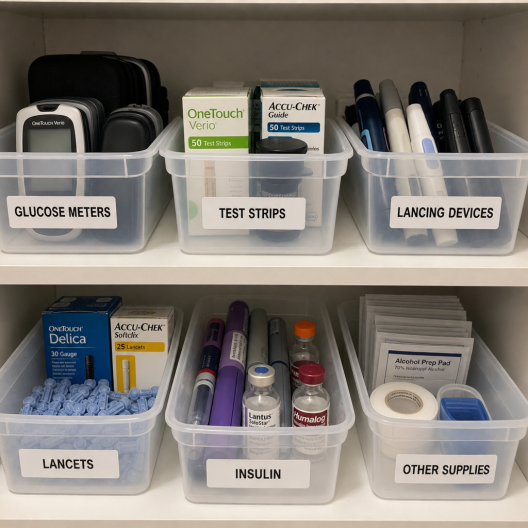
Use zones instead of one crowded cabinet. One zone can hold current CGM supplies, one can hold pod or pump supplies, one can hold low-treatment items, and one can hold emergency backups. Put the newest boxes behind the oldest boxes so items are used before they expire. If your household uses both a CGM and pods, label shelves by device name rather than by vague categories like “diabetes stuff.”
A simple home inventory rhythm
Check inventory on the same day each week. Count what is unopened, what is in the active bag, and what is close to expiration. This prevents the classic dad panic of discovering that the last sensor was used yesterday or that the pod box in the closet fits the previous system. A quick spreadsheet or note app is enough. Track item name, quantity, expiration date, and whether it is current, backup, surplus, or disposal. If you are considering whether to sell diabetic supplies, this record also helps you know exactly what you have before contacting any buyer.
How should you handle CGMs, pods, and sharps safely?
Handle supplies based on whether they are unused, opened, worn, expired, contaminated, or sharp. Used needles and sharps should go directly into a sharps disposal container, and FDA-cleared sharps containers are designed to be puncture-resistant, leak-resistant, and tightly lidded. (fda.gov)
Do not treat every diabetes item the same way. A sealed box of pods is very different from a used inserter, lancet, or infusion component. Used items can create injury or infection risk, and they should not be mixed with household clutter, donation boxes, or resale piles. The FDA also notes that if a cleared sharps container is not available, a heavy-duty plastic household container may be used as an alternative in some situations. (fda.gov)
Sorting supplies by next action
Use four piles when cleaning out a cabinet:
1. Keep current supplies: unopened, in-date items for the active device. 2. Keep backup supplies: items your care team says are appropriate for emergency use. 3. Review surplus supplies: unopened items that are no longer needed but may have value.
4. Dispose safely: expired, opened, used, damaged, contaminated, or sharp items. This sorting step keeps safety first. It also helps you avoid accidentally offering items that should never leave your home.
Responsible decisions about surplus supplies
Surplus happens for normal reasons. A prescription changes, a child outgrows a routine, insurance ships before an upgrade, or a device switch leaves unopened supplies behind. Some families search for ways to sell diabetic supplies because they do not want usable items to sit forgotten in a closet.
Before selling anything, check the rules that apply to your supplies, your insurance, and your state. Be especially careful with items connected to prescriptions, government insurance, or specific dispensing rules. Medicare covers certain medically necessary durable medical equipment and related supplies when conditions are met, and CMS publishes detailed rules for suppliers and covered diabetes supplies. (medicare.gov)
If you contact a company that buys surplus supplies, ask direct questions. Do they accept only sealed, unexpired boxes? Do they reject anything opened, damaged, marked by insurance restrictions, or temperature-compromised? Do they explain their process clearly? A reputable process should not pressure you to hide where supplies came from or misrepresent their condition.
Selling Omnipods with care
If your family switched pod systems or changed therapy, you may have searched “sell Omnipods” while staring at unopened boxes. The careful approach is to verify the exact product, condition, expiration date, and whether the boxes are eligible for resale before making any commitment.
Do not guess. Omnipod products can vary by generation and compatibility, and buyers such as BuyMyCGM may have strict acceptance rules. Keep boxes sealed, avoid removing labels, and photograph only what a buyer needs to evaluate the product. Never include private health information in photos, emails, or packing materials.
Upgrade-day preparation
The best upgrade day feels boring. Batteries are charged, app logins work, adhesives are ready, the old system has not been thrown away too soon, and the backup plan is printed or saved. If your child is old enough, involve them in the setup so the technology feels less like something being managed around them and more like a tool they understand.
Pack a transition kit with:
● New device supplies for the first change cycle.
● Backup glucose meter or approved backup monitoring method.
● Fast-acting carbs and routine low supplies.
● Adhesive patches or skin-prep items already approved for use.
● Charging cables, batteries, or receiver accessories.
● Clinic contact details and after-hours instructions.
● A labeled bag for old supplies that need review later.
The transition kit reduces decision fatigue. Instead of searching every drawer, you can focus on the person using the technology.
Common mistakes to avoid
The first mistake is mixing old and new supplies. This creates confusion and can lead to grabbing the wrong item when you are rushed. Label everything during the first week of the upgrade.
The second mistake is throwing away backups too early. Ask the care team what should remain available until the new system is dependable. A device upgrade is not complete just because the first sensor or pod is applied.
The third mistake is treating surplus as automatically sellable. The FDA warns consumers not to buy pre-owned glucose test strips because they may produce incorrect results or be unsafe, which is a useful reminder that medical supply condition and sourcing matter. (fda.gov)
The dad mindset: calm, organized, and safety-first
Managing diabetes tech is not about being perfect. It is about building repeatable systems that protect your family when life gets busy. Good labels, simple storage, safe disposal, and a written backup plan can turn a stressful upgrade into a manageable project.
If you decide to sell diabetic supplies or sell Omnipods, treat it as the final step after safety, medical guidance, and eligibility checks. Keep what your family needs, dispose of what is unsafe, and only move forward with surplus supplies when you are confident they are sealed, appropriate, and handled responsibly.