

If your Wi-Fi seems to pick the worst possible moments to quit-right before a homework upload, during a client call, or halfway through family movie night-you’re not imagining it. Your household may have simply outgrown the plan.
A lot of parents looking for the best internet for families in Florida are really looking for peace. Fewer frozen screens. Less shouting about lag. No more “Who is downloading something?” from the hallway.
In 2024, the percentage of Households With Access to Broadband Internet in Florida was 91.6%. So for many families, the bigger issue is no longer basic access. It’s whether the plan actually fits your home, your habits, your weather, and your budget.
Understanding Unique Internet Needs of Florida Families
Florida homes are busy online now. Work calls, streaming, gaming, school portals, smart cameras, tablets, phones, and TVs all compete for space on the same connection.
Before you compare plans, take a breath and look at what your family really does every day.
Consider Users, Rooms, and Devices
A home with two adults, three kids, several phones, smart TVs, tablets, cameras, and a gaming console can overwhelm a bargain plan fast. When comparing Florida internet service providers, don’t let the lowest price do all the talking. Match the plan to how your house actually runs.
For households in HOA communities, condos, or larger Florida neighborhoods, fiber-to-the-home services from Fibernow Fiber Internet Provider can offer managed Wi-Fi, symmetrical multi-gig speeds, and U.S.-based customer support. Those details matter when streaming, remote work, home security, and family devices are all online at once.
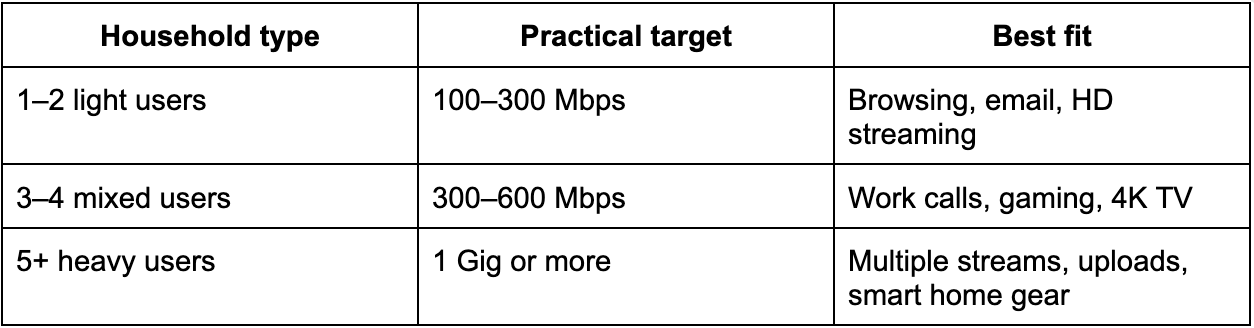
Match Speed to Household Size
A smaller household may be fine with modest speeds. A larger family needs breathing room, especially during evenings when everyone is online. If you’re searching for how to choose an internet plan, start with simultaneous use instead of chasing the biggest advertised number.
Look for Family-Friendly Tools
Speed matters, of course. But day-to-day sanity often comes from the smaller features. A good app, Wi-Fi 6 or 6E router, guest network, parental controls, and smart home support can make the whole house easier to manage.
An average of 76.4% of customers can now receive downstream speeds of 1 Gig or higher, up from 67.1% in 2023, 60.9% in 2022, and 55.4% in 2021. In plain English, gig-ready service is becoming more common. It is not just for hardcore tech families anymore.
Still, fancy features won’t save a weak connection. The connection type has to keep up when the whole house piles on.
Picking the Right Connection for Heavy Use and Florida Weather
Once you narrow down the connection type, focus on reliability. A plan can look perfect on paper and still disappoint if it struggles at peak hours or during rough weather.
Florida, as you know, adds its own little twist: storms.
Fiber, Cable, DSL, or Satellite?
Fiber is usually a strong fit for heavy streaming, gaming, cloud backups, video calls, and remote work because uploads and downloads can be similar. That helps when one person is on Zoom, another is gaming, and someone else is uploading school files.
Cable can also work well, especially where fiber is not available. Just remember that shared neighborhood demand may slow things down during busy evening windows.
DSL is usually more of a fallback when better wired options are not available. Satellite can be useful for rural homes, but lag may frustrate gamers and anyone who lives on video calls.
Plan for Storms and Outages
Florida storms have a way of finding weak links. Ask providers about battery backup, buried fiber where available, outage alerts, and network monitoring.
If you live near the coast or in a storm-prone community, it is worth asking about redundancy. A cheap plan stops feeling cheap when work, school, phones, and security cameras all go dark at the same time.
The goal is not just fast internet on a sunny Tuesday. You want service that holds up when your household actually needs it.
Budget, Contracts, Wi-Fi Coverage, and Safety
Once reliability is handled, cost comes next. For larger families, monthly bills can stack up quickly. But the lowest advertised price is not always the lowest real price.
Watch Bundles and Hidden Fees
Internet plus TV, streaming, phone, or home security can save money if you actually use those services. If not, the “deal” may just be a bigger bill in disguise.
Ask about equipment rental, installation, early termination fees, taxes, and data overage rules. Month-to-month plans can help if you may move soon or if your HOA is reviewing a neighborhood-wide service option.
In some communities, bulk agreements can lower per-home costs and simplify billing. That may not sound exciting, but fewer confusing bills is a small household victory.
Fix Weak Wi-Fi Inside the Home
Even with high speed internet Florida service, bad router placement can ruin everything. Put the router near the center of the home, away from thick walls, metal, and closed cabinets.
Large homes, long floor plans, and two-story layouts often need mesh Wi-Fi instead of one lonely router trying its best from a corner. Add parental controls for bedtime schedules, site blocking, device pauses, and safer browsing.
Bundles may reduce the sticker price, but coverage and fees decide whether the plan truly works for your family.
Eco-Friendly, Future-Ready Choices and a Buying Checklist
A strong home network is useful today. A future-ready one saves you from replacing gear next year.
Many Florida families also care about energy use and long-term value. Fiber often has an advantage because it can carry more data with less strain than older copper-based systems.
Think About Tomorrow’s Devices
VR, AI assistants, 4K cameras, cloud gaming, and smart appliances will keep increasing household demand. Gear that supports Wi-Fi 6 or 6E, mesh coverage, and gigabit speeds can help you avoid another upgrade too soon.
Families comparing best internet for families in Florida should ask whether the provider supports managed Wi-Fi, smart home security, and future speed increases. Nobody wants to keep swapping equipment like it’s a seasonal chore.
Use This Quick Checklist Before Buying
Before you sign, ask: What speed reaches my home? Are upload speeds listed? Is there a data cap? What fees are missing from the ad? Is support U.S.-based? Is storm backup offered? Can I switch without losing service?
Schedule installation before canceling your old plan. Then test work calls, streaming, gaming, and security cameras before making the final cut. That overlap might save you from a very messy Monday morning.
Final Thoughts on Choosing Internet for a Growing Florida Home
The right internet plan starts with your real life: people, devices, rooms, storms, work, school, entertainment, and budget. Compare connection types, check upload speeds, read the fees, and make sure Wi-Fi reaches every corner.
For many Florida communities, fiber offers a strong path for speed, reliability, and future smart home needs. Use the checklist, compare internet options for large households, and choose a plan your family can grow into-not one you have already outgrown.
Common Questions Florida Families Ask Before Switching
What Provider Has the Worst Wi-Fi?
No provider is always the worst. Wi-Fi depends on the router, home layout, interference, and plan speed. If several rooms lag, the issue may be weak equipment placement or poor mesh coverage, not only the provider.
Is Starlink Better Than Regular Internet?
Starlink can help rural homes with limited wired access. But fiber or cable usually offers lower lag and steadier speeds. For gaming, work calls, and large families, wired service is often the safer choice.
What Are Warning Signs That My Plan is Too Slow?
Frequent buffering, frozen video calls, slow uploads, gaming lag, and security cameras dropping offline are clear signs. If problems show up when several people are online, your family probably needs more speed, better Wi-Fi gear, or both.