

Giving someone a streaming box can be a thoughtful gift, especially if they enjoy watching films, television programs, or other online entertainment. But for someone who has never used one before, opening the box is only the beginning. They may not know which cable goes where, how to connect the device to the internet, or why the television sometimes needs to be switched to a different input.
A streaming device from the SuperBox range is one option to consider when choosing a gift. As with any device, compare the available features, connection requirements, and supported services with the recipient's television and everyday viewing needs before making a decision.
The best preparation depends on the recipient. A person who already uses apps on a smartphone may learn the basics quickly, while someone who prefers traditional television controls may need a more patient introduction. Thinking about the person before preparing the gift can make the difference between a device that sits unused and one that becomes part of their daily routine.
Begin With the Basics They Will Need
Before wrapping the gift, check exactly what is included in the package. Most streaming setups need a compatible television, the appropriate connection cable, a power supply, and access to a suitable internet connection. Some accessories may be included with the device, so check the package contents before buying extras.
An available HDMI port is particularly important because many streaming boxes connect to a television through HDMI. If the recipient has an older television, confirm its available connections rather than assuming the device will work with it. Checking compatibility in advance can prevent the disappointment of discovering that an essential connection is missing after the gift has been opened.
It is also worth asking whether the recipient has reliable Wi-Fi near the television. A strong connection in another part of the home does not guarantee good coverage in the living room or bedroom. If the signal is weak, the recipient may need help improving the router's position or exploring another compatible connection method.
Make the First Setup Feel Manageable
For a first-time user, the first ten minutes can shape how they feel about the entire gift. If connecting the device involves unfamiliar menus, passwords, and several remotes, the recipient may assume it is difficult to use. A calm introduction makes the process less stressful.
If possible, connect the device before giving it away, or offer to help set it up after the recipient opens the gift. Connect the appropriate cables, select the correct HDMI input on the television, and follow the on-screen instructions. Then demonstrate the basic tasks: opening the home screen, finding an app, adjusting the volume, and returning to regular television viewing if the setup allows it.
Avoid explaining every feature in one sitting. Someone who has never used a streaming box does not need to learn about recording, multiple viewing windows, network settings, and every available menu on the first day. Begin with the controls they will use most often. Other features can be introduced gradually when there is a reason to use them.
It is equally important to let the recipient try the controls themselves. Watching someone else complete the setup is not the same as remembering how to do it independently. Give them time to open an app, move through the menus, and practise returning to the main screen. A little hands-on experience builds confidence much faster than a long technical explanation.
Put Together a Small Getting-Started Kit
A few inexpensive additions can make the gift more useful without making it unnecessarily complicated. Consider what the recipient might need on the day they first use the device.
A simple printed guide is often the most valuable extra. Use large, readable text and explain the basic steps in the order they should be completed. Include the names of the remotes, the television input to select, and the steps for connecting to Wi-Fi. If the recipient prefers paper instructions to online help pages, leave the guide somewhere easy to find.
Cable organisation is another thoughtful detail. A few reusable cable ties can keep the power and HDMI cables tidy behind the television. If the device will sit on a shelf, make sure it has enough space and that the cables are not pulled tightly around furniture. Avoid buying extra cables until you know which connections the recipient actually needs.
A notebook can also be useful for keeping non-sensitive setup information, such as the name of the Wi-Fi network or the location of the television's input controls. Do not write passwords in an openly visible guide. Help the recipient store account details securely instead, and let them enter their own passwords where appropriate.
Choosing a Model That Will Not Overwhelm Them
A first-time user does not necessarily need the most advanced streaming box available. What matters is whether the device provides a comfortable starting point and enough capability for the person's expected use. Someone who mainly watches a few familiar services may have different priorities from a person who enjoys exploring multiple viewing options.
The SuperBox S8 Pro is one model worth considering when comparing options. Its published specifications include 32GB of storage, 4GB of memory, Wi-Fi 6 support, Gigabit Ethernet, Picture-in-Picture, and recording for supported content. It also offers a redesigned interface and a remote with voice-control functionality, according to the product information. Features such as recording and multiple viewing options may require some explanation for a new user, so focus on the functions they are most likely to enjoy.
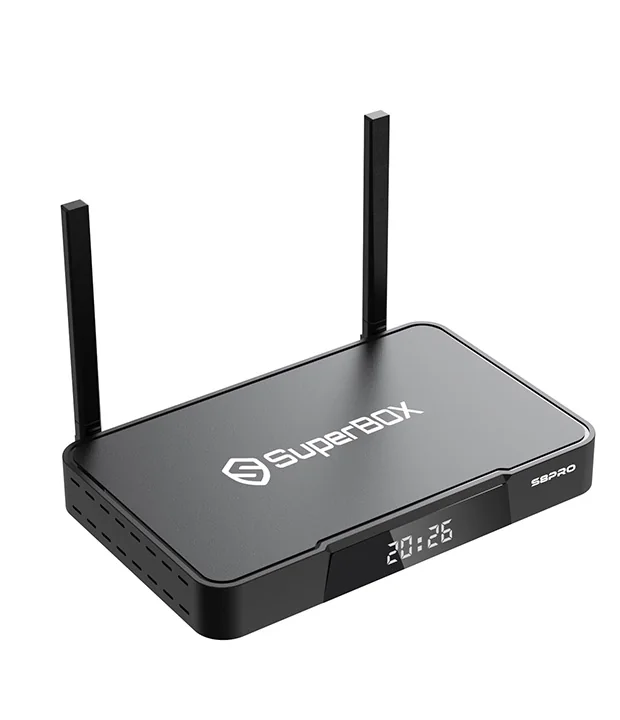
Storage capacity alone should not decide the purchase. The recipient may never need advanced viewing features, or they may appreciate having them once they become familiar with the device. Before buying, check the current product specifications, included accessories, connection requirements, and supported services. You should also confirm that the television has the required input and that the recipient has reliable internet access.
The aim is to give them a device they can grow comfortable with, rather than one that feels like a technical project.
Explain What the Device Does—and What It Does Not
A first-time user may reasonably assume that a streaming box works just like a traditional cable or satellite receiver. It helps to explain the difference before they begin. The box connects to the television and provides access to compatible apps and supported entertainment features, while internet access and the relevant content services determine what can actually be watched.
Some apps require an existing subscription, an account, or a separate payment for particular films and programs. Availability can also vary by location and service provider. Explain these points in simple language so the recipient knows what to expect and does not mistake a service requirement for a fault with the device.
If the recipient is concerned about privacy, help them review account settings and use passwords they control. If children will use the television, take time to review the parental controls offered by the device and the apps. These settings vary, so do not promise that one control will manage every type of content.
It is also worth making clear that an internet problem may affect streaming even when the box itself is working correctly. Knowing this distinction can help a new user recognise whether to check the Wi-Fi connection, restart a device according to its instructions, or seek assistance.
Give Them Someone to Ask
Even with a good guide, the recipient may forget a step or encounter a message they have never seen before. Let them know they can ask for help without feeling embarrassed. This is especially useful if they are moving from a traditional television setup to a device with several apps and settings.
If you live nearby, offer to help with the first setup and show them how to find the manufacturer's support information. If you live farther away, consider arranging a short video call when they first connect the device. You can then explain the controls while they follow the steps themselves.
Keep your instructions patient and practical. If something does not work, check one thing at a time instead of changing several settings at once. Confirm the power connection, television input, and internet connection before assuming the device is faulty. A methodical approach helps the recipient learn how to handle common issues independently.
A Gift That Becomes More Useful With Time
A streaming box is most successful as a gift when the recipient feels comfortable using it after the excitement of opening the package has passed. The device matters, but so do the cables, the setup instructions, the explanation of subscriptions, and the reassurance that help is available.
Choose equipment that suits their television and viewing habits, prepare the essentials, and keep the first lesson focused on a few everyday tasks. A model such as the SuperBox S8 Pro may suit someone who wants to explore different supported viewing options, provided its features and requirements match their needs.
Above all, make the experience personal. Set aside time to watch a film together, show them how to find a favourite program, or let them practise using the remote at their own pace. The real value of the gift is not how many features it has. It is whether the recipient can use it with confidence and enjoy it long after the wrapping paper has been cleared away.